A customer may find a business easily, make an inquiry, complete a purchase, and still leave with a poor impression because one part of the journey did not work well. Customer Journey Analytics helps businesses examine these stages together to identify friction, recurring problems, and service gaps.
For businesses in Pakistan, this approach can be useful when customer interactions happen across different teams, branches, or service stages. Instead of focusing only on the final rating or outcome, businesses can examine where the experience starts to break down.
How Can Analytics Expose Problems in the Customer Journey?
Yes. Customer Journey Analytics can help businesses identify service gaps by analyzing patterns across different customer interactions.
A service gap may appear when:
Customers repeatedly abandon the same stage.
A particular process causes frequent delays.
Customers need repeated assistance.
One location performs differently from others.
Negative experiences appear after an otherwise successful interaction.
The same issue appears across multiple customer responses.
The purpose is not to assume that every unusual result is a problem. Instead, analytics helps teams identify patterns that deserve further investigation.
What Does a Customer Journey Include?
A customer journey is the sequence of interactions between a customer and a business.
The exact journey depends on the industry, but it may include:
Finding the business
Making an inquiry
Comparing products or services
Placing an order or booking
Receiving the product or service
Contacting support
Providing an opinion
Returning for another purchase
Different businesses will have different stages.
For example, a restaurant may focus heavily on ordering, waiting time, dining, payment, and post-visit interactions. A service company may pay more attention to inquiries, appointments, delivery, support, and follow-up.
This matters because a business cannot improve the journey effectively without first understanding where its important customer interactions happen.
Which Stages Are Most Likely to Have Service Gaps?
Not every stage creates the same level of friction. Businesses should pay particular attention to points where customers need to take action or wait for a response.
Before the Purchase
Potential problems can occur when customers are researching or trying to contact a business.
Warning signs may include:
Repeated questions about the same information
Slow responses to inquiries
Customers leaving before completing an inquiry
Confusion about products or services
These patterns may indicate unclear information or inefficient communication.
During Purchase or Service Delivery
The main transaction can also create friction.
Businesses may need to investigate:
Waiting times
Communication issues
Complicated procedures
Inconsistent service
Problems completing an order
A recurring problem at this stage can have a direct effect on the overall customer experience.
After the Purchase
The journey does not necessarily end when a transaction is complete.
Customers may still interact with a business through support, follow-up, complaints, or future purchases.
If problems repeatedly appear after the purchase, the business should investigate whether its support or follow-up process needs attention.
How Can Businesses Validate a Service Gap?
Analytics can highlight a pattern, but it does not automatically explain the cause.
Suppose customers repeatedly mention long waiting times.
A business can:
Identify when the problem occurs.
Compare the issue across locations or periods.
Review related customer comments.
Investigate the internal process.
Make a targeted change.
Monitor whether the issue decreases.
This approach prevents businesses from making major decisions based on one isolated response.
The goal is to connect customer signals with operational context before deciding what needs to change.
Customer Journey Analytics vs. Traditional Reporting
Traditional reporting and journey analytics answer different questions.
Traditional Reporting:
Focuses on individual metrics
Shows performance at a particular point
Reports what happened
May show average ratings or response numbers
Customer Journey Analytics:
Examines multiple stages
Connects different customer signals
Helps identify friction points
Looks for recurring patterns
Provides context for business decisions
For example, a report may show that customer satisfaction declined. Journey analysis can help determine whether the change is connected to a particular stage, location, or process.
Where Does Customer Feedback Fit?
Customer feedback can provide valuable context about what customers experienced.
Customer feedback software can help businesses collect and organize customer input, while journey analysis can help identify patterns within that information.
A customer feedback management tool may be useful when a business needs a more structured way to manage customer responses and related information.
Trusted Optics provides collection tools, analytics dashboards, review management tools, automation tools, and enterprise capabilities.
The important point is to avoid treating every customer comment as a complete explanation. Recurring signals should be considered alongside business context before action is taken.
How Can Businesses Compare Different Locations?
A multi-location business can have a healthy overall performance while one branch experiences recurring problems.
Looking only at the company-wide average can hide these differences.
Businesses can compare locations to ask:
Which location has recurring service issues?
Are similar problems appearing across multiple branches?
Is one location performing differently from the overall business?
Did a problem start recently?
Did performance change after a process improvement?
Location-based analysis can therefore help management decide whether an issue requires a company-wide response or a location-specific solution.
When Should Businesses Use Automation?
Analytics can identify important patterns, but businesses also need a practical process for handling routine actions.
Automation tools can support activities such as:
Sending customer surveys
Triggering alerts based on defined conditions
Supporting follow-up workflows
Reducing repetitive manual tasks
Automation should have a clear purpose. Sensitive or complex customer situations may still require human judgment.
The best approach is to automate repetitive processes while keeping people involved where context and decision-making matter.
What Should Businesses Check About Integrations?
Integrations become important when customer-related information is spread across different systems.
Depending on the business, relevant systems could include:
Accounting systems
Payment gateways
POS platforms
Booking systems
WhatsApp
E-commerce platforms
However, businesses should confirm whether a specific integration is actually supported before choosing a SaaS provider.
Ask about the exact integration, supported data, workflow direction, setup requirements, and any additional costs.
No specific integrations are claimed for Trusted Optics here because none were provided in the product inputs.
What Pricing Factors Should Businesses Consider?
Pricing should be evaluated according to actual usage rather than the headline price alone.
Trusted Optics currently lists three plans:
Basic: 2 locations, up to 1,000 feedback per month — PKR 2,520/month with annual billing
Pro: 10 locations, up to 5,000 feedback per month — PKR 6,300/month with annual billing
Enterprise: 25 locations, up to 25,000 feedback per month — PKR 12,600/month with annual billing
Businesses should also check:
Additional location costs
Usage limits
Custom enterprise requirements
Integration requirements
Onboarding or implementation needs
The pricing page also provides options for adding locations and directs businesses toward sales for custom enterprise requirements.
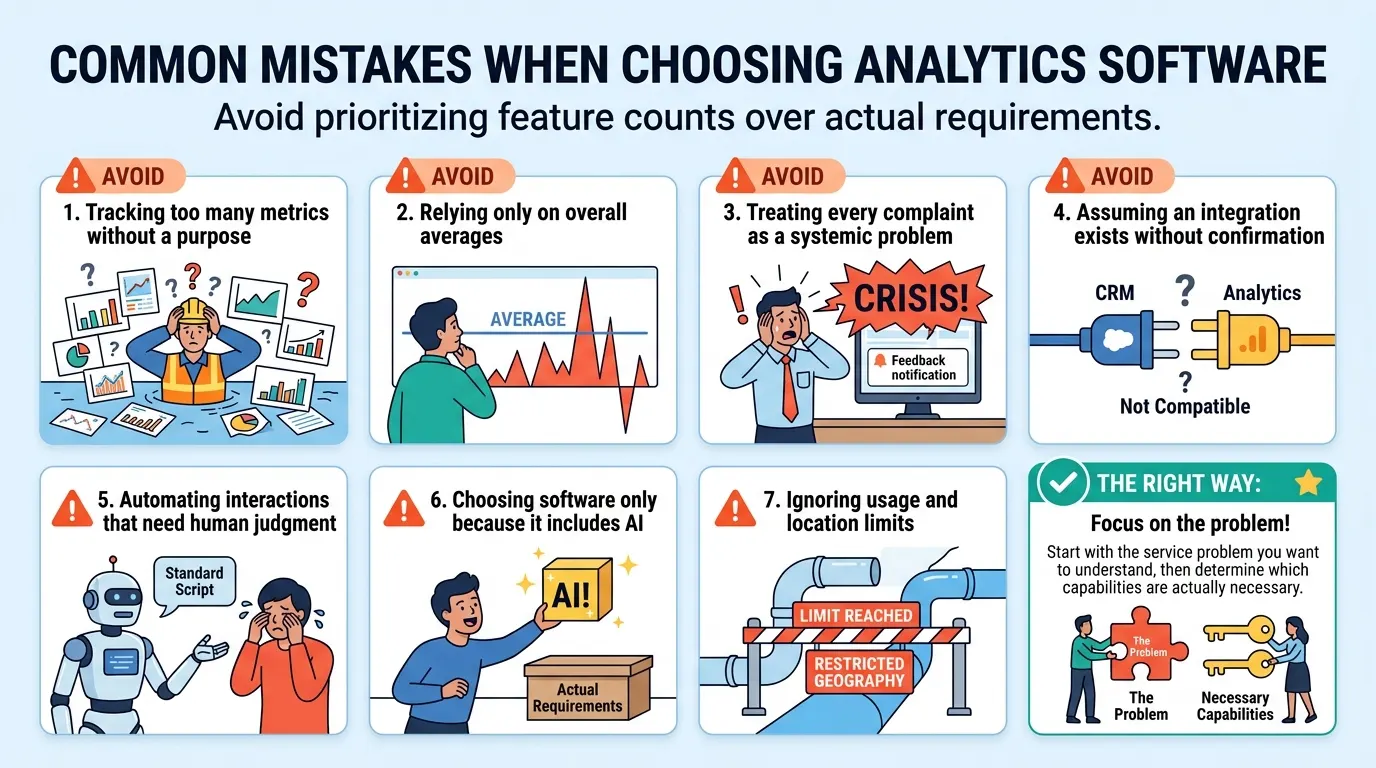
Common Mistakes When Choosing Analytics Software
Businesses can make poor technology decisions when they focus on feature counts instead of actual requirements.
Avoid:
Tracking too many metrics without a clear purpose
Relying only on overall averages
Treating every complaint as a systemic problem
Assuming an integration exists without confirmation
Automating interactions that need human judgment
Choosing software only because it includes AI
Ignoring usage and location limits
Start with the service problem you want to understand, then determine which capabilities are actually necessary.
Who Needs Customer Journey Analytics Most?
Customer Journey Analytics is not equally useful for every business.
A small business with a simple customer journey and low interaction volume may be able to manage its processes manually.
It becomes more useful when a business has:
Multiple customer touchpoints
Several locations or departments
High interaction volume
Complex service processes
Difficulty identifying where customers encounter problems
A need to compare performance over time
The right level of analytics depends on the complexity of the business rather than its size alone.
How to Evaluate a SaaS Provider
Before selecting a platform, evaluate how well it fits your actual workflow.
Ask:
Does it support the customer journey stages we need to monitor?
Can it handle our expected volume?
Can teams compare locations or departments?
What analytics and reporting are available?
Which integrations are supported?
What are the usage and location limits?
What onboarding support is included?
What additional costs may apply?
A practical evaluation should focus on whether the software helps solve a real business problem.
FAQS
What is Customer Journey Analytics?
Customer Journey Analytics examines customer interactions across different stages to identify patterns, friction, and service gaps.
Can Customer Journey Analytics improve customer experience?
Yes, it can help businesses identify recurring problems and focus improvement efforts on specific journey stages.
How does customer feedback support journey analysis?
Customer feedback provides context that can help businesses understand what customers experience at different stages.
Is Customer Journey Analytics useful for small businesses?
It can be useful when a business has multiple touchpoints, growing interaction volume, or a more complex customer journey.
Conclusion
Customer Journey Analytics helps businesses identify friction, recurring issues, and service gaps across customer interactions. Trusted Optics combines collection tools, analytics dashboards, review management, automation, and enterprise capabilities to support better customer experience management.
Contact Us to see how Trusted Optics can help identify and address service gaps.
Author Bio
Trusted Optics provides practical resources on customer experience, analytics, review management, and business insights to help organizations make informed decisions.
Written by
Alex Jones
Contributing writer sharing insights and expertise on customer experience and business growth.